High-Speed of the Past?

Ah, yes, we embrace high-speed online learning…

…as long as you’re okay with connection speeds only marginally better than a high-tech and cutting-edge DSL connection from 1994.

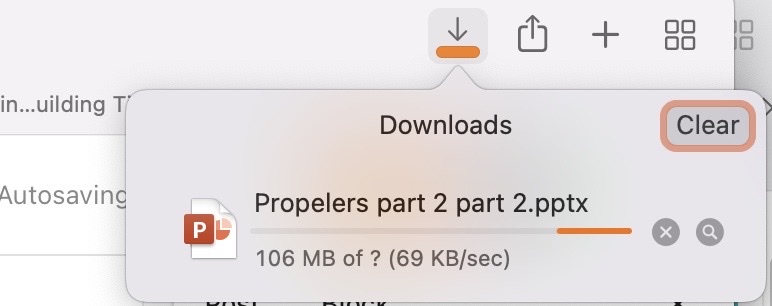
I need to fetch a 600MB Powerpoint presentation to review some notes on a (24MB) video that was embedded in it. But I’m at the mercy of the hosting provider’s CDN, which seems little more than an overloaded Raspberry Pi sponging off of its neighbor’s unsecured WiFi.

Yes, yes, clearly the creator misspelled “Propellers”, try not to judge. But the question is: how large is it? Not sure — I’ve been waiting for about 30 min or so. I’ll just sit and ponder the mysteries of the universe while I wait so I can extract one embedded element.

A carrier pigeon would be faster.

Tech Humor?

For anyone who has been writing code for any length of time, you’ve no doubt encountered the the occasional error of “TypeError: null is not an object”. The cause is obvious once you understand what different types can be defined. But the first time you encounter it without any awareness of what types are, it can be absolutely maddening to grok and correct.

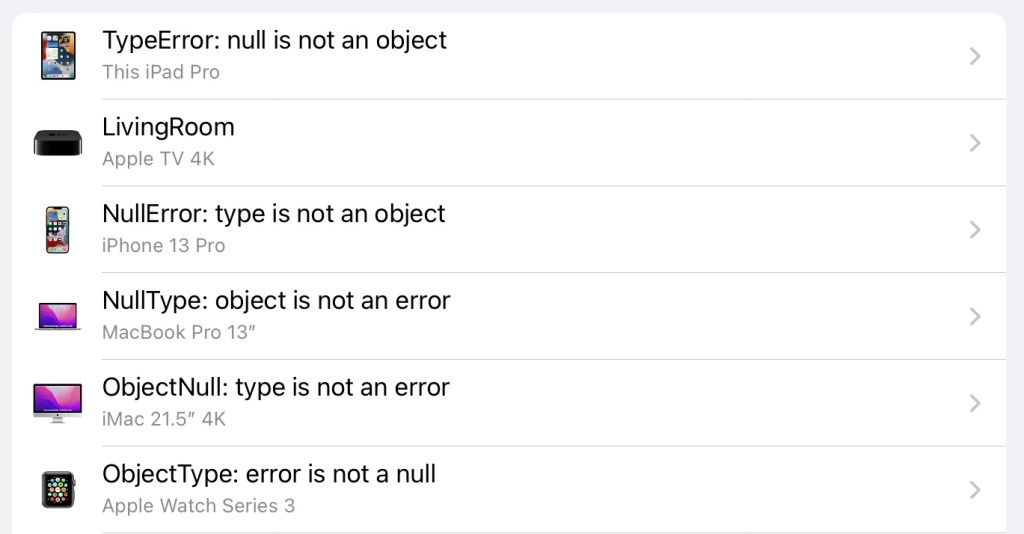
Because I have a strange sense of humor, I renamed my iPad, iPhone, and notebook… with even less meaningful variations of the TypeError:

ErrorError: error is not an error

It seems the Apple TV doesn’t accept some variant of that naming type. Could be the inclusion of the colon, or spaces, or even the length of the name. Too lazy to track down the reason.

Also, don’t forget that the name you assign in the Sharing pane of System Settings is also applied to the system HOSTNAME var. The first time after a week that I’d opened one of my terminals, I found myself wondering, “Why is the .bashrc throwing an ‘NullTypeobjectis…’ — oh, duh…”

Hmm… I wonder if they’ll tolerate unicode characters.

Memories of Before

I’m clicking around on Canva for no reason in particular. It does seem that I’ve been here before, but I couldn’t recall when or why.

Oh, look — there’s a login function and it does appear that my Mac keychain has stored a username and password that I’d used on here before, so we’ll give it a go.

Well, that worked.

Hey, look, there’s also a “All your designs” section. I wonder what’s there…

…and suddenly it all became a bit more clear, about why I had memories of having been here before. I was trying out this new “Canva” thing and seeing if it would have any value for our team or for presentations. In fact, I could even say with absolute certainty that it was on December, 20, 2017 — just days before The Fall.

Apparently, I was trying out a humorous visual aide for a talk that I was planning on giving at the end of Christmas when the teams returned at the beginning of the year and that I’d include in a discussion with onboarding of the Noida team.

Breaker of Stuff, Doer of Things — Bitesize: Enabling Efficiency

Probably only really meaningful to maybe two or three hundred people around the globe.

I certainly do miss being involved with the motley crew of most capable and admirable designers, developers, and engineers.

Emojis are Hard…

<rant>

American English speakers, listen up — and, yes, this does tend to be primarily a monolingual American issue, so I’m calling you out. Why? Because languages are more than just twenty-six letters and a few numerals along with words and concepts more complex and expressive than “fuck” with every other utterance.

Sharing a sad tale of fear, isolation, and sorrow and following it with this 🀣 or this πŸ˜‚ won’t convey the message or meaning that you think it will. Those are “rolling on the floor, laughing” and “tears of joy”.

Unless, of course, you’re a fan of Sadism or perhaps Schadenfreude. Self-schadenfreude? Is that a thing? I’m reminded of a line from Prisoner of Azkaban, “So you’re gonna suffer, but you’re gonna be happy about it.”

If you insist on including a few emojis in your statement, perhaps what you mean to use is this: 😒 or this 😭

And, while I’m at it — because it seems that people still have some difficulty with this new-fangled interwebs-fad and the whole emojis concept — this is the flag of the nation of Liberia: πŸ‡±πŸ‡·

While this is the American flag: πŸ‡ΊπŸ‡Έ

Wow, we really skewed things when we gave Latin/English/Americans an extra 146,859 characters more than the 26 letters in the English alphabet.

</rant>

And Now for Something Completely Different

Not long ago — in the 32-bit days of MacOS, the OSX days — it had a feature built-in to the Keychain Access tool that would create pronounceable passwords.

They removed it.

**sigh**

So, I came up with a trivial bash-based solution. https://github.com/w1lnx/passphrase

And, as its ReadMe says:

Quick tool to generate meaningful memorable password phrases.

Presently in macOS 10.15.5, the Password Assistant offers only these four options with (examples for reference):

  • Letters & Numbers: BWib0hGLZg0N…
  • Numbers Only: 3311049148…
  • Random: x*B{m6MNH…
  • FIPS-181 Compliant: wehritirby…

Every one of them will generate a password that is either quite difficult for a human to remember, or, paradoxically, trivially-simple for a computer to brute-force. See also:Β xkcd #936

This is an expeditious interim solution.

Uses the word list that is included with all macOS / OS X versions and randomly selects a word length and uses generally-safe characters to separate them.

Usage

Only need to run the passphrase.sh script:

./passphrase.sh

Also, seriously, just read the shell script before you run it. It’s not very long at all and not at all complex — it does contain some rather uncommon bash terms.

But if you’re scratching your head for a password when you create a new account somewhere, rather than rely on the old standards of ‘changeme’, ‘password1’, ‘12345’, or ‘correct horse battery staple’ (or any other amazingly common passwords), just type passphrase.sh and it’ll create and present to you a sufficiently-random password that you can just copy/paste into the account creation and your keyring.