So I’m using the iPhone Measure app to plot out a size of a small structure. After I capture two edges, I walk over to virtually draw out a third… carefully STEPPING OVER one of the virtual drawn lines.
🤦♂️
Yep, augmented reality can be immersive enough.
I know how to use and am quite comfortable with a landscape tape (which I have) and a theodolite (which I don’t have), I have to say that, yes, the iPhone’s Measure tool is quite accurate — it does have some curious behavior over uneven surfaces, but over the surface that I was estimating a layout, it’s demonstrated to be within about an inch over a 26-foot distance.
If the surface were flatter, it would probably be spot-on.
Now, if we could find a way to have it snap to 90-degree angles — that would be even more amazing than it already is.
Because it most certainly isn’t. It’s perhaps better written nUSB and perhaps pronounced “new ess bea” rather than “yoo ess bea”… and we all know that n is short for “not”, as in, Not Universal Serial Bus.
Here’s the thing… for being “universal”, it has a bewildering combination of protocols, data delivery speeds, physical connector types, power usage and delivery. Thankfully (ha!) there are only two cable lengths.
How so?
Let’s see, there USB v1.0, v1.1, v2.0, v3.0, then v3.1
There’s low-speed, full-speed, hi-speed, SuperSpeed, and a version of SuperSpeed that’s available for v3.1.
You have USB-A connectors, which is reasonable, then there’s USB-B connectors along with mini-B and micro-B. Complicating things a bit further, you’ve 3.x B and 3.x micro-B. Let’s not forget USB-C
For power availability, thankfully, v1.0 and v1.1 didn’t provide any, but everything else can provide 500mA, 900mA, 1.5A, and even 3.0A (at 5V in all cases).
I know, I’m just being dramatic. It’s not really 875 different combinations. No, no, of course not. It has been narrowed-down — refined a bit.
But when you go out to buy a nUSB cable, choose carefully.
I’ve been hosting ADS-B receivers from FlightAware and FlightRadar24 for a few years now. Living in ML, I had an optimal location. Sure, there were limitations from mountains 100 miles away, but in general, I could pick up aircraft broadcasts above Portland, Seattle, Spokane, Richland.
Before we’d sold the house, I started receiving regular alerts from FlightAware that my receiver was offline. Checked everything, of course: it’s connected, nothing’s changed, device is plugged into the network, DHCP service is showing the device is alive. Even its own onboard diagnostics are even showing that it’s fine… except…
I sent an email to FlightAware to let them know it was offline and suggested that perhaps its 1090 radio was faulty.
They were rather dismissive. “No. Just double check it’s plugged in and connected to the network.”
It is. It’s reporting an error with the 1090 receiver.
“No. Just make sure it’s plugged in.”
Time passed. Moved house. And finally got round to taking a closer look…
I don’t have a prime location now. I can’t even get the antenna atop the rental’s roof. But, I can improvise a bit.
Right, so my FlightRadar24 receiver continues to work just fine. Well, limited receive range of course, but still fine.
But the FlightAware receiver…
It has an “internal” USB receiver. Just a simplistic RTL dongle from the looks of things.
I have a few spare RTL SDRs. Soooo… plug it in, power it up and it reports that everything is normal. Works fine. Still rather annoyed that FlightAware was dismissive of the issue I was reporting. But it works now.
Someday, I’ll see about having the receive antennas as high as possible. Perhaps I’ll have an antenna tower installed at the “next house”.
Even worse, asking a user to restart or reboot their own device actually underscores a huge gap in the design of your own platform, not at all with their own system.
If you’re wishing to access a Mac file share from a Windows machine, there’s one thing needed that’s often overlooked.
First, assume you’re just needing to have Windows machines access a file share presented from the Mac.
Creating the share — you can use any folder you wish, or even a drive. I’ll just use an existing folder to share with a Windows machine — and because I lack the “creative naming” gene, I’ll just call it WinBackups and put it on one of my Data drives.
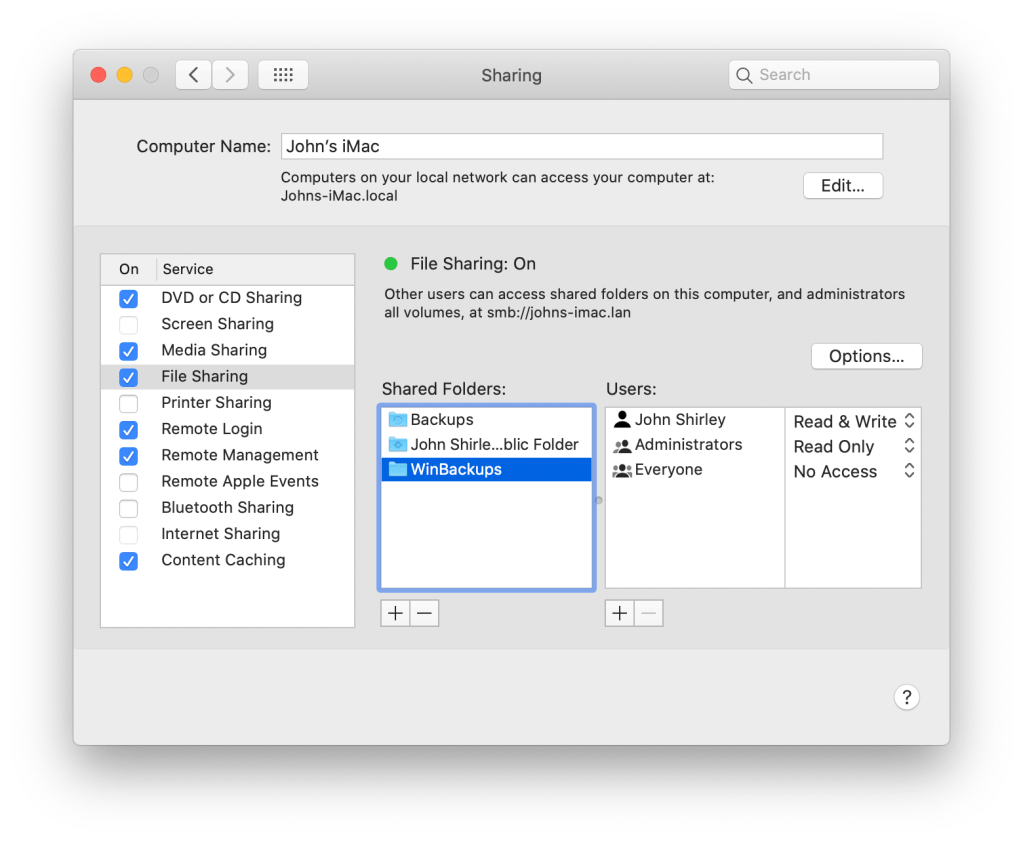
Next, we’ll go to Sharing in System Preferences to add it as a File Sharing object. Here, you can see that I have one for Backups, a default public Drop Box for my own account, and the new…
I’ve set it to No Access for everyone, and because I’m going to use my own account, added it for Read & Write access.
Next, ensure it’s presented as a Windows share. Right-click the share name then click Advanced Options. Because I need to exist in a platform-agnostic world, ensure Share over is SMB and AFP. Everything else can be left unchecked.
Click OK.
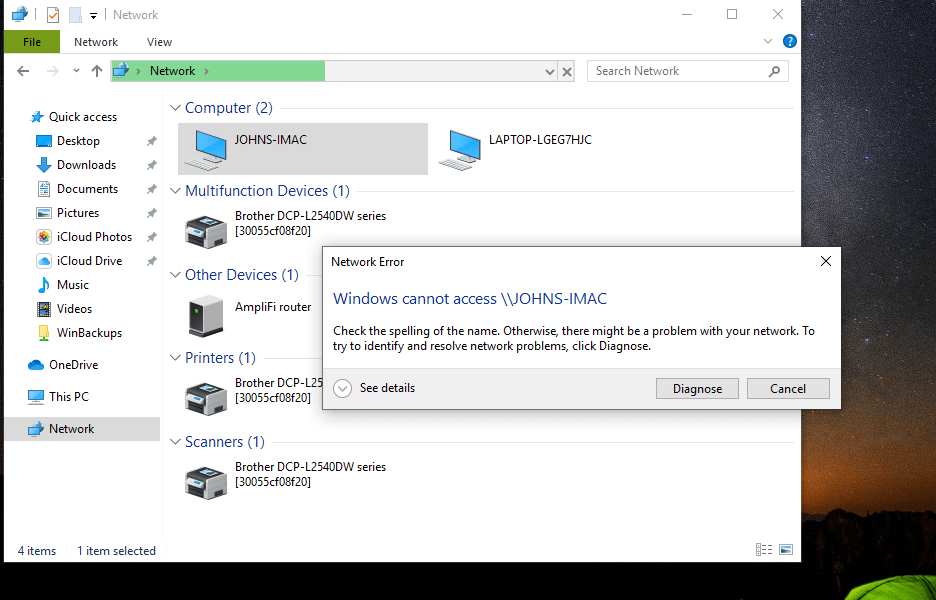
And try from Windows…
That’s annoying.
But not to worry!
There’s another step — strangely — because some Windows computers handle the password exchange differently. So, in a way, Mac passwords and password handling is too secure (?), or something.
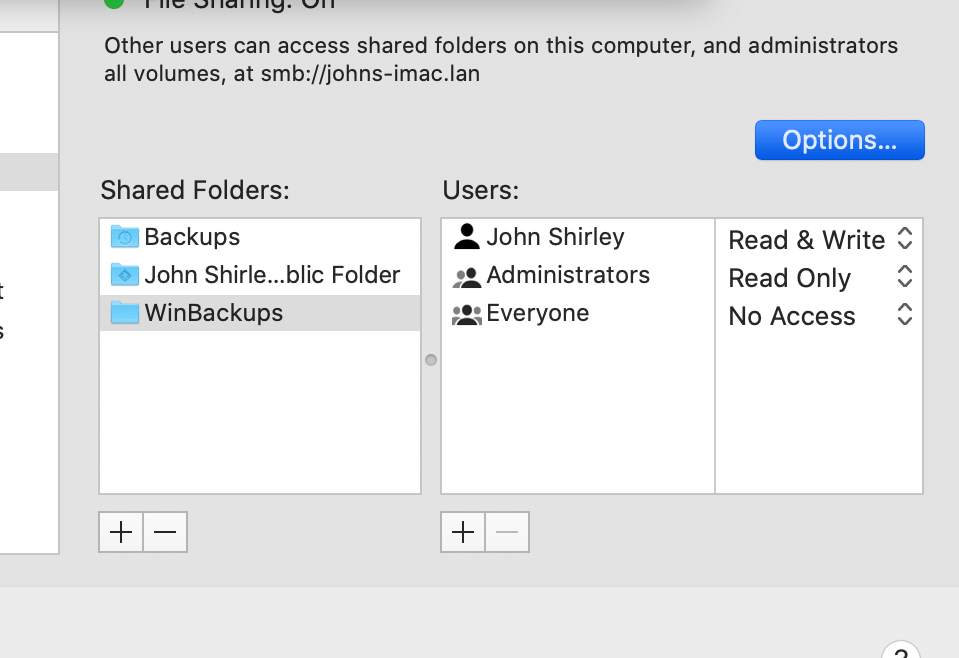
In System Preferences, go to Sharing > File Sharing > select the specific share point, then click Options.
Enable the checkbox to Share files and folders using SMB. Next, check off each username from the list presented. You’ll need to type each user’s password when prompted.
Click Done.
And, viewing it from DOS, because why not:
C:\Users\esthe>net view
Server Name            Remark

\\JOHNS-IMAC           John's iMac
\\LAPTOP-LGEG7HJC
The command completed successfully.

C:\Users\esthe>net view \\johns-imac
Shared resources at \\johns-imac

Share name                    Type  Used as  Comment

Backups                       Disk
John Shirley's Public Folder  Disk
WinBackups                    Disk
The command completed successfully.

C:\Users\esthe>net use u: \johns-imac\winbackups
The command completed successfully.

C:\Users\esthe>dir u:
 Volume in drive U is Data
 Volume Serial Number is 0000-0000

 Directory of U:\

03/07/2020  03:02 PM    <DIR>            .
03/07/2020  03:02 PM    <DIR>            ..
02/24/2020  07:36 PM     1,646,760,758 Microsoft_Office_16.34.20020900_BusinessPro_Installer.pkg
03/07/2020  03:01 PM    <DIR>            SCC
03/07/2020  03:02 PM    <DIR>            SFCC
               1 File(s) 1,646,760,758 bytes
               4 Dir(s) 1,637,838,020,608 bytes free

C:\Users\esthe>shutdown /s /f /t 0






 the rest of me