This Is An Alert…

Please god—you do not need to send alerts for absolutely every automatic process. And, no, “just in case” is even more meaningless.

Alerts are an interruption for someone. It’s a mechanism to tell someone that something has occured that the automation doesn’t know how to handle. This has happened, here’s why and what you need to do.

I can’t count the number of times that I’ve seen alerts going out to interrupt everyone to let them know that automation has done the automatic things that it was normally expected to do.

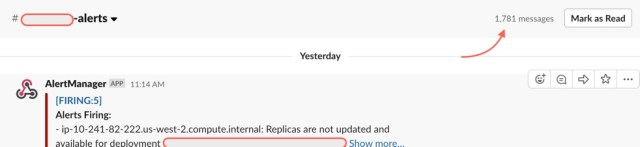
Image 5-1-19 at 10.12
In 24h, this channel was notifying the SRE team of — automation doing its job. 1,781 times.

It’s exactly like sending…

*thump*

…a notification for every…

*thump*

…heartbeat. I only want to know…

*thump*

…if it’s not doing what it’s…

*thump*

…implemented to handle…

*beeeeeeeep*

…automatically. Then I’ll worry about it.

Work + Reality = Entertainment

So, we’re approaching tax season here in the USA. The company’s HR team sends out an update to the company via email.

Somebody replies to the sender with an innocent-enough request of, “Hey, my form is incorrect. How can I get it changed?”

The originator replied… and… I readied some popcorn to enjoy the show.

Then all hell broke loose.

People hit Reply-All — hundreds of them — and insisted on being removed from the distro, making snarky remarks and comments about the originator, or about the entirely mundane tax issue. Still more people even hit Reply All and warned everyone to not hit Reply All.

How could it be prevented?

It can’t.

Well, not unless you were to ensure that people sending out company-wide emails obscured all recipient names from each other[1] or we eliminated email[2] or learned how to not fan the flames[3] that would feed trolls[4], or…

Obviously, somebody made a harmless mistake. No blood. No foul. It’s a good lesson, I think: “Ah, right. As we learned 40-ish years ago about email, be careful not to do that.” But for an education company, there are a surprising number of employees who seem rather intent on ignoring the educational opportunity that this has presented.

…like not hitting Reply All then demonstrating to the entire company what an inconsiderate asshole you’ve turned in to.

[1] – We work together. We already know your email address.

[2] – and email isn’t going to “go away”.

[3] – there was that one time that a parent yelled at her kids to tell them to stop yelling.

[4] – because the trolls were going to eat their free cookies.

The Panacea-Tool Incident

A few years ago — 2014 maybe? — we were in the early days of distributed teams and were spread across three timezones. Timing was awkward. So, many of us would start our day from home to join calls and meetings. This was, for us the beginnings of regular telecommuting. To help ease the communications challenges, we also embraced the concepts of video conferencing, screen shares, and multimedia to communicate.

One morning, there was expert brought in to demonstrate and train the lot of us on the new Panacea that the company had invested in: an app that would help manage all of our systems. It was a unified, do-everything tool that would provide visibility of specific known-states and anomalies on any number of systems across our several geographic locations and datacenters. It would pin down the precise, exact origin of a problem, and eliminate the need to log into a server (via SSH, of course) ever again… in order to resolve the issue.

Anyway, while doing the demo, there was this one error that would occur, which would prevent moving any further with a demo or training.

It was something about a missing object, or log file, or permissions to it.

If only there was a tool that had the power and capacity to identify the problem and resolve it… we could use that. It would be a perfect opportunity!

Their sales engineer was stumped.

After he fought with it for half an hour or so, I suggested, that we take a quick look at the actual logs on the system. Odds are pretty good that they’d indicate where the problem was. There was no harm in checking.

“No!” he’d assert. “That’s the wrong way!” And we endured continuous rants of frustrations and borderline vulgarities from him. “This guy!” he had jokingly exclaimed, “What you want to do is impossible!

Oh, I’m sorry… I thought you had used the word, “IMPOSSIBLE.” just there.

Challenge accepted.

I quickly shared my screen and jumped over and skimmed the actual logs from the app on the server itself. Let’s see… at the end of the log file, it had logged that it had crashed. Why? Scroll up a few lines and… permission denied trying to write to one of its own files.

“Oh! I’ll just ‘chmod’ that file so its owner can write to it…”

He boisterously interrupted, “If that’s it, I’ll buy you a steak dinner!”

**tap,tap,tap** **Enter** “Okay, all set… let’s give it another try really quick…”

The problem went away. He was clearly offended that somebody could’ve done it “the wrong way” to find the problem and fix it so quickly.

Took about 20 seconds.

And the really amusing part is that all of this was perfect scenarios to demonstrate the power and capability of the app itself.

CPU Load Isn’t A Performance Indicator

Ever.

Let me clarify.

While CPU Load has value, it’s interpretation depends on a thorough understanding of what it’s actually indicating and why. It’s no longer meaningful as performance indicator, because it suggests a physical CPU’s ability to keep up with some processing load. This is easily grossly misinterpreted and misunderstood.

Why is this a problem?

Let’s start with jobs that are run during an idle state. Or, more specifically, the niceness of a process.

There are processes that, by design — and a lot of them — are de-prioritized and will use resources only if they’re available.

Anyone recall the SETI@home project? Remember how it would happily run “in the background”? It was designed with the priority concept where it would have some quantity of work that it needed to work on, but because it was a background job, if you wanted any resources at all, it would happily step out of the way and yield the CPU load.

It wasn’t the first. There are loads of system-level tasks that do exactly the same thing. Rather than sit idle, doing nothing at all until you ask it for something, there are loads of background tasks that it’s doing.

The classic interpretation of “CPU Load” or processor load and such as a metric indication of system performance would’ve suggested that the system load was too high and that it needed additional resources.

But it wasn’t.

It was just running exactly as it was designed and doing the work that it was meant to and would happily put things into a wait state if you wanted to do anything else.

In fact, even when effectively idle, a CPU will run at precisely the clock rate that it was intended to. Long ago, Unix started presenting a CPU Load Average — an indicator of the average number of processes that were waiting for the CPU (called a Wait State) during a the last one, five, or fifteen minutes.

These, too, will return an extremely high figure should a lower priority process want to run.

Normal.

Also, “Priorities”. They work.

Nowadays, we have much the same challenge — working to change perspectives, helping people to unlearn what they’ve learned — but on containerized workloads.

“But teh CPU! MOARSERVERESZ!”

Wrong perspective. The right perspective is to ask yourself instead, “How’s my app’s performance?” Is it responsive to requests that it receives? Ask yourself, “Have I taken every conceivable step I can to improve its performance?” You have? All of them that you can? Are you sure?Have you also taken steps to fundamentally shrink its instruction set so it’s not carrying around all of that unneeded bloat? I’m not referring to code-bloat — code-bloat is a separate problem there, too — but, more foundational than code: have you reduced the CPU instruction set?